
Fiber Internet Inside Your Building: What Fiber Optic Cabling Actually Solves
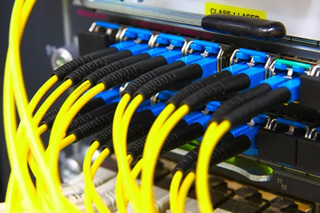
If your Norfolk VA business pays for fast internet but teams still see lag, dropped calls, or frozen screens, the issue is usually inside the building. Modern fiber optic cabling fixes the weak links between floors, telecom rooms, and work areas so your service speed reaches the people who need it. This guide explains what fiber changes, why it matters for busy offices from Downtown to Ghent, and how a clean design keeps your network stable all year.
Why Fiber Optic Cabling Solves Building Internet Pain
Most bottlenecks live between your provider’s handoff and your users. Copper links and old switches struggle with today’s cloud apps, video meetings, and file sync. Fiber removes those choke points by moving data over light, not electricity.
- Higher throughput across floors so large uploads and backups do not stall.
- Stronger reliability in dense spaces where wireless and copper pick up interference.
- Longer runs without signal loss, ideal for spread-out sites from warehouses to campuses.
- Room to grow: upgrades often mean replacing optics, not pulling new cable.
In plain terms, fiber brings your paid internet speed the last mile inside the building. It keeps work moving when meetings stack up and deadlines approach.
What Changes Inside the Walls
Think of your building network like roads. The provider brings a highway to your demarcation. Inside, you need wide avenues between floors and rooms. Fiber becomes the backbone from the main equipment room to each floor’s telecom room, while short copper runs still serve desks and devices.
A typical design uses a main distribution frame on the entry floor and intermediate rooms above it. Fiber risers connect those rooms, then switches fan out to work areas. When your backbone is fibered, traffic moves freely and users stop competing for a narrow lane. If you are planning a refresh, review the full stack of networking services so the cabling, optics, and switches align.
Reliability Through Norfolk Weather And Older Buildings
Coastal weather brings wind, humidity, and fast pressure swings. Older brick and steel construction around Downtown and Ocean View can make Wi-Fi patchy and copper noisy. Fiber is immune to electromagnetic interference and carries signal farther with less loss, which boosts uptime when conditions are rough.
During nor’easters or hurricane season, stable internal links help phones, access control, and building systems stay connected to the cloud. Fiber also supports diverse paths and redundancy between rooms, so a single damaged cable does not take down a whole floor.
Speed Where It Counts: Backbones, Risers, And Work Areas
Not every cable must be fiber. Use it where it makes the biggest difference: building backbone, vertical risers, and long horizontal runs. Short copper drops can still serve phones, printers, and access points near desks. The result is a hybrid that delivers speed without re-cabling every wall.
Proper labeling and documentation matter. When risers, patch fields, and optics are mapped, growth is simple. Your team can scale from a few dozen users to several hundred without redesigning the core.
Security, Segmentation, And Peace Of Mind
Fiber enables clean network design that isolates departments, guests, and critical systems. When the backbone is strong, you can segment traffic without slowing it down. That protects sensitive data for healthcare, finance, and government tenants while keeping visitor Wi-Fi responsive.
Pairing fiber backbones with modern switches supports role-based access, monitoring, and fast incident recovery. If a device misbehaves, you can quarantine it while everyone else keeps working.
Migration Paths That Work For Norfolk Offices
Most buildings do not jump to all-fiber in one step. A phased path is common: fiber up the risers, upgrade floor switches, then address long copper runs that cause the worst slowdowns. This lowers disruption and fits remodel schedules in busy corridors like Military Highway and Colley Avenue.
If your contract renewal is coming up, align your internal upgrade with it. That way, any new speed tier from your provider actually shows up at the desk. For a quick primer on options, explore business fiber internet resources from Baron Communication Inc and see how the pieces fit.
Signs Your Building Is Ready For Fiber Internet Installation
- Teams rely on cloud tools, voice, and video all day and calls still drop.
- Speed tests look fine at the modem but slow on upper floors.
- Remote workers complain about large file sync and VPN timeouts.
- Cabinets are packed, with old switches daisy-chained across rooms.
- There is mixed cabling (CAT5 and unknown runs) with no clear labeling.
Any one of these is a clue the inside plant is holding you back. Two or more usually means the backbone needs attention.
What To Expect During A Pro Install
A skilled team starts with a walkthrough to confirm rooms, power, grounding, and pathways. They plan routes that respect ceiling types, elevators, and fire-stopping. The crew then pulls and secures the fiber, terminates ends for clean light transmission, and validates performance with certified tests.
You receive documentation that shows paths, panels, and ports. That record speeds up future changes and helps with compliance requests. If your project involves tenant build-outs or renovations, coordinate early so cable pathways and general construction support do not compete for the same space.
Local Context: Buildings, Tenants, And Daily Traffic
Many Norfolk facilities are mixed-use or multi-tenant. Port logistics, healthcare, and higher education all bring peak traffic at predictable times. A fiber backbone absorbs those surges, keeping charting apps, learning platforms, and warehouse scanners responsive when lines get long.
Older properties often have long hallway runs and thick walls. Fiber handles those distances without the guesswork of repeaters or amplifiers. It is also lighter and thinner, which helps when pathways are crowded.
Make The Most Of Your Investment
Speed alone does not solve user pain. Design matters. Focus your budget where results are biggest: core switches, vertical risers, and long horizontal runs. Keep copper for short drops. Document everything. Train staff on basic port locations and escalation paths.
Protect uptime during storm season with clear maintenance windows. Plan pathways before ceiling work starts so trades do not fight for the same space. Label both ends of every run to speed future changes. Review security segments yearly as teams and tools evolve.
How Baron Communication Inc Helps
Baron Communication Inc is a local Networking Company that designs and installs building network cabling for busy Norfolk VA organizations. The team maps spaces, right-sizes the backbone, and stands behind the work with documented test results. If comparing options, review how fiber internet installation supports growth without daily disruption.
Coordination with IT and facilities ensures moves, adds, and changes stay simple. When switching, wireless, and cabling align under one plan, projects remain efficient and accountable.
Get A Clean, Fast Network You Can Trust
If ready to stop fighting lag and downtime, talk with Baron Communication Inc about commercial fiber solutions that fit your building and schedule. Call 757-392-2226 to set a site walk in Norfolk VA or nearby. Your teams deserve the speed already being paid for.