
Security Control Rooms: AV and Network Design Tips for Clear Video and Reliable Recording
 As digital communication becomes increasingly essential for business success, the strength of your network can make or break your ability to collaborate, serve customers, and stay competitive. As a Chesapeake networking company, we know that faster, more reliable internet can completely transform the way businesses communicate and operate. Whether you're dealing with choppy video calls, poor VOIP quality, or sluggish file sharing, fiber can make all the difference.
Clear video and rock-solid recording start with thoughtful design. In Chesapeake VA, humidity, thunderstorms, and long summer days can stress equipment and staff. This guide covers practical AV and network choices that help operators see more, act faster, and document everything. If you want a deeper look at layouts and hardware standards, explore our security control rooms page for service details from {{ company-name }}.
What a Clear, Dependable Control Room Delivers
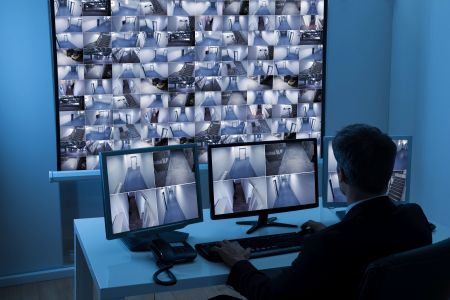
A good control room gives your team confidence. Operators can spot motion on a perimeter camera, pull up a dock view without delay, and export an incident clip that plays smoothly. Schools near Great Bridge, warehouses around Greenbrier, and facilities by Deep Creek all share the same goal: consistent visibility without missed moments.
Think of the room like an orchestra. When AV, networking, and storage play in tune, small issues never turn into big ones. Your operators feel calm, not overwhelmed.
AV System Design Basics for Control Rooms
Sightlines and Video Walls
Begin with where eyes land. Place the primary video wall or monitors directly in front of the most active operator. Secondary displays should sit inside a comfortable head turn, not a full chair swivel. **Design sightlines first** so critical feeds never hide behind menus or at the edge of vision.
For bays with big windows, morning sun in neighborhoods like Great Bridge can wash out screens. Consider neutral wall colors, a matte finish for displays, and motorized shading where needed. Even small glare fixes reduce eye strain over long shifts.
Operator Consoles and Workstations
Ergonomic consoles with cable pass-throughs keep power strips and adapters out of sight and out of harm’s way. Height-adjustable stations help teams on rotating shifts. Keep keyboard-to-monitor distance consistent across positions so muscle memory works in your favor.
Lighting and Acoustics
Layer the lighting: dimmable overheads for room balance, task lights for notes, and backlighting behind the video wall to reduce contrast. Add acoustic panels or soft finishes to tame HVAC noise and hard surfaces. Quiet rooms improve radio clarity and reduce fatigue.
Network Video Systems That Stay Reliable
Bandwidth, Switches, and Uplinks
IP cameras speak in streams. The network must listen without interruption. Size uplinks for peak traffic, not averages. PoE switches should keep 20 to 30 percent headroom for future cameras and seasonal loads, especially in busy months when more motion means higher bitrates.
Use managed switches that support multicast and proper IGMP snooping so the same feed does not swamp multiple ports. Keep camera VLANs separate from office traffic to avoid surprise slowdowns during large file transfers.
Quality of Service and Latency
Prioritize live video and control traffic with QoS. If a clip export competes with a live wall, give the wall first pick. Small latency tweaks turn choppy pans into smooth movement, which matters when you are following a truck across a yard near the Elizabeth River or monitoring a gate during shift change.
Redundancy and Power Protection
Plan for the moment when something fails. Bonded uplinks or redundant core paths keep streams alive if one link drops. **Protect your network switches** with UPS units sized for the load and verified runtime. Add surge protection to guard against summer lightning and brief power dips common during heavy storms.
Place NVRs and core switches in a conditioned rack with front-to-back airflow. Keep dust out and temperature stable to reduce fan noise and extend hardware life.
Storage and Retention Strategy That Fits Your Risk
Reliable recording is more than terabytes. It is matching storage and settings to your actual risk window. Retention needs vary by camera count, resolution, frame rate, and how much motion each scene sees. Loading docks in Greenbrier or Western Branch may record more activity than a quiet hallway, so plan for the busiest feeds when sizing.
Use RAID to tolerate drive failures and consider a hot spare for faster rebuilds. Health checks should alert your team before a drive becomes a problem. For critical cameras, pair local NVR storage with periodic offsite exports for investigative resilience.
Camera Settings That Balance Clarity and Storage
Right-size clarity without bloating storage. Most incident review benefits from steady 1080p or 4MP at balanced bitrates. Use WDR where lobby doors face afternoon sun to prevent silhouettes. **Avoid maxing every setting**; higher resolution helps only if the lens, lighting, and angle support the detail you want.
Set key cameras with slightly higher frame rates for vehicle plates or fast movement. For static areas, lower frame rates save space with little trade-off. Keep encoding profiles consistent so exports play cleanly across devices.
Designing for Operators, Not Just Equipment
People power the room. Arrange monitors by task clusters: perimeter on top, entries at eye level, specialty views near the supervisor. Map hotkeys so operators can jump between layouts without digging through menus. **Test in real lighting** with the actual team before final sign-off to catch small comfort tweaks.
Create a quiet corner for call review and incident writing. Add a whiteboard or digital dashboard that tracks open events. Small workflow supports prevent missed handoffs during shift change.
Chesapeake Weather and System Resilience
Chesapeake’s humid summers and storm season can mean short outages and voltage swings. Build for continuity. UPS coverage should include cameras at critical doors, core switches, NVRs, wall processors, and the control room workstations. A generator or secondary power plan helps sites that must stay live for public safety or essential operations.
Network closets near loading docks or exterior walls need extra sealing and dehumidification. Label and elevate critical gear to keep it safe from minor leaks or floor cleaning.
Plan for power events before storm season. Even a brief outage can corrupt recordings if storage is unprotected. Pair UPS units with graceful shutdowns and routine battery tests to protect your footage.
AV and Network Checkpoints Before You Go Live
Use these quick checks to confirm you are ready for 24/7 use:
- Verify video wall brightness and color balance match across panels.
- Confirm camera VLANs, QoS rules, and multicast settings on every switch.
- Test failover paths by briefly removing a link and watching for stream continuity.
- Run an export drill and play the clip on a standard laptop for compatibility.
If any step fails, fix it before training. Operators remember their first week in the room. Smooth experience builds trust fast.
Integration That Reduces Clicks
When access control, intercoms, and alarms connect to the same interface, operators move from alert to action without hunting for windows. Camera call-ups tied to door events speed response at gates and lobbies. Map views with clear labels help new staff learn the site quickly.
Keep integrations modular so you can add cameras, readers, or analytics later. A well-documented API and standards-based video make upgrades predictable.
Scalability for New Wings, Lots, and Cameras
Growth is normal in Chesapeake VA. Business parks add bays, schools expand wings, and HOAs update gates. Design your core with spare switch ports, extra rack space, and a little more power than you need today. That cushion keeps tomorrow’s projects from forcing a disruptive rebuild.
Budget time for network documentation. Label every run, record switch configs, and keep diagrams updated. **Good documentation is a safety net** when a stormy night turns into a busy morning.
How Baron Communication Inc. Builds It Right the First Time
As a local networking company, Baron Communication Inc. focuses on reliable video transport, clean AV layouts, and retention that matches your risk window. Our team handles site walks in places like Great Bridge and Greenbrier, then designs a plan that fits your building, power, and staffing. We stage core gear before installation so the first day on site is about clean cable work, not guesswork.
If you want a quick overview of packages and options, you can review how we approach security control rooms and see what a finished system includes from intake to training. We keep the process simple so your operators get what they need without extra steps.
When to Upgrade and What to Prioritize
You do not have to replace everything at once. Prioritize the bottleneck. If walls are crisp but recordings stutter, look at uplinks and NVR performance. If storage is solid but live views lag, focus on switch configuration and QoS. For rooms with older furniture, new consoles and lighting can deliver a surprising boost in comfort and awareness.
Schedule upgrades outside of peak periods, like early mornings for retail or between class bells for campuses. Staged work keeps you operational and avoids retraining twice.
Local Use Cases You Can Picture
Consider a logistics yard near Battlefield Boulevard watching inbound trucks. The operator needs smooth pans and a quick way to jump between dock doors. Or picture a community pool gate in summer. Clear backlight handling at sunset and a fast clip export can settle a question in minutes. These everyday scenarios drive our design choices.
For multi-building sites split between Deep Creek and Western Branch, a resilient core with remote viewing keeps managers in sync. The right mix of bandwidth, storage, and clean AV layouts saves time during every shift.
Ready to Plan Your Control Room
If you are researching security control rooms in Chesapeake VA, you are already thinking about clarity and uptime. Let Baron Communication Inc. translate that into a plan you can trust. We will size the network, map the AV, and set storage so your team gets consistent results all year. To move forward, call us at 757-392-2226 or reach out to schedule your site walk. Our team is ready to help you plan, stage, and deploy with confidence.
When you are ready to take the next step, connect with our specialists and plan your control room design on a timeline that fits your operation.